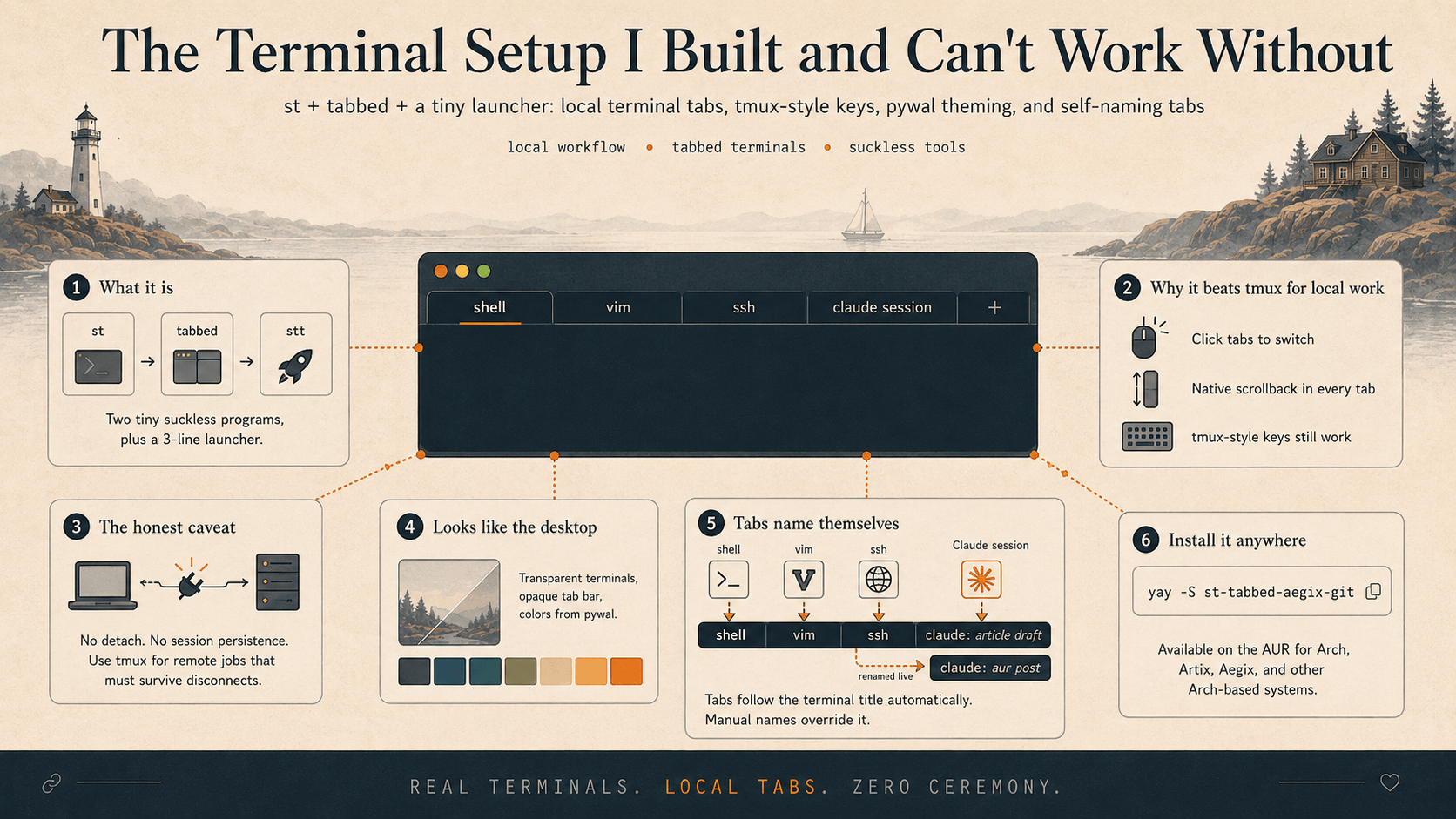
A couple of weeks ago I patched two tiny terminal programs into the setup I now run all day — and I'm not going back. It gives me tabs full of real terminals — click one to switch, or fly between them from the keyboard. They're see-through over my wallpaper and themed to match the rest of my desktop. And the part I still grin at every time: the tabs name themselves.
I called the result st-tabbed-aegix-git and put it on the AUR, so you can install it in one command on any Arch-based machine (we'll get there). Here's what it does — and why I built it.
What it actually is
Two tiny programs, each doing one job. st is a terminal emulator — the window that shows your shell. tabbed is a generic little container that embeds other programs as tabs. Point tabbed at st and you get a strip of tabs across the top, each one a complete, independent terminal. A three-line launcher named stt glues them together. That's the whole thing.
Both come from suckless, a project whose entire philosophy is "do the job in as little code as possible, then get out of the way." You don't need to know any of that to use this — but it's why the result is fast, small, and endlessly tweakable.
Why I reach for it instead of tmux
If you've met tmux, you know it can carve a terminal into panes and windows. This scratches a similar itch, with two differences that won me over — and one honest caveat.
You can just click. A newcomer doesn't have to memorize a single command: click a tab to switch, scroll with the mouse wheel, done. The thing that actually broke me on tmux was scrollback — switch to another window, then try to scroll up through what it printed, and suddenly you're fumbling into "copy mode" keybindings before you can read your own output. Here, every tab is a genuine terminal with its own native scrollback. Switch to it, scroll up, read. No mode, no prefix, no ceremony.
Your tmux muscle memory still works. If you do live in tmux, I wired the keybindings to match: Ctrl+b then c for a new tab, n/p to move between them, and so on. So the newcomer clicks and the veteran never lifts their hands off home row. Both win.
The honest caveat: no detached sessions
Here's the one thing you must know if you're coming from tmux. For years, tmux meant exactly one thing to me: start a long job on a server, detach, close my laptop, drive across town, ssh back in, reattach, and pick up precisely where I left off. This tool does not do that. It has no session persistence and nothing to detach from. It is a local development tool — tabs for the terminals on the machine right in front of you.
So they aren't really rivals; they just look alike. If you need a session that survives a disconnect, use tmux — that's still the right tool for it. If you want comfortable, clickable, good-looking tabs for your everyday local work, that's this.
Getting around
Three ways to drive it — use whichever you like, or mix them:
| Want to… | Mouse | Quick keys | tmux-style |
|---|---|---|---|
| Switch tab | click it | Ctrl+Shift+N / P |
Ctrl+b then n / p |
| New tab | — | Ctrl+Shift+T |
Ctrl+b then c |
| Jump to tab N | click it | Ctrl+1…0 |
Ctrl+b then 1…0 |
| Close tab | — | Ctrl+q |
Ctrl+b then x |
| Scroll back | wheel | Shift+PageUp |
Shift+PageUp |
There's nothing to configure to get started. And if you do want to change a binding, it's a couple of lines in one file — that suckless hackability again.
It looks like the rest of my desktop
The terminals are transparent over my wallpaper, and their colors come straight from pywal — so when I re-theme my desktop from a new wallpaper, the tabs re-theme right along with it. There's no separate config to keep in sync; it reads the same system colors everything else on my screen does.
(Getting the tab bar opaque while keeping the terminals see-through cost me an embarrassing afternoon chasing a single missing byte in how a color was stored — a bug that made 0.9 and 1.0 opacity look identical. It took far longer to find than to fix, which is the usual ratio.)
Name your tabs — or let them name themselves
Press Ctrl+b then , and a little prompt asks for a tab name. Type it, press enter, and that tab keeps that name. Classic.
But here's the feature I didn't actually build — I just got out of its way. A tab automatically shows the title of whatever's running in it. Your shell, vim, an ssh session — anything that sets the terminal title shows up on the tab, for free.
And this is where it gets fun if you work with Claude Code like I do. Claude sets the terminal title to the name of your current session. So my tabs label themselves with what I'm working on — and if I run /rename to rename a Claude session, the tab updates to match, live, while I watch. I rename the conversation; the tab follows. Every single time.
I want to be clear that this isn't some clever integration I wrote. Terminals have broadcast their title for decades; tabbed just listens. All I added was the opt-out — the manual Ctrl+b , name — so that a tab you've named by hand stops following along. I built the override, not the feature. The coolest thing in here was already in the box.
Install it anywhere
It's on the AUR. If that's new to you: the Arch User Repository is a huge community catalog of install recipes for Arch-based systems — Arch, Artix, my own Aegix, and friends. With a helper like yay, installing from it is one line:
yay -S st-tabbed-aegix-git
That pulls down the terminal, the tabbed container, and the stt launcher, builds them, and you're done. Run stt and you've got tabs. It works on any Arch / Artix / Aegix box, not just mine. (If you're curious how these suckless tools get from my laptop to the AUR in the first place, I wrote that up separately: From ~/.local/src to the AUR.)
Not on Arch? Nothing here is Arch-specific — these are suckless tools, so the install really is just git clone and sudo make clean install; the AUR package only automates that part. On Debian or Ubuntu you grab the build dependencies first, then build it from source:
sudo apt install build-essential libx11-dev libxft-dev libfontconfig1-dev
git clone https://github.com/AegixLinux/tabbed && cd tabbed && sudo make clean install
You'll also want st itself, which is rarely packaged outside Arch — so build it the same way (from AegixLinux/st or stock suckless st). For the extras: dmenu powers the rename prompt (Debian ships it in suckless-tools), xprop backs it (x11-utils), and any compositor like picom gives you the transparency.
Why this one matters to me
This one stuck. It's load-bearing now — the place my actual work happens all day. It started as an itch about scrollback and turned into a couple hundred lines of C: a tmux-style keybinding mode, an honest fight with X11 transparency, tab colors wired to the system theme, and a package anyone can install.
yay -S st-tabbed-aegix-git