Co-authored with Mason U Borchard
A practical standard operating procedure for teams managing branching, releases, SQL changes, and deployments in a corporate software environment.
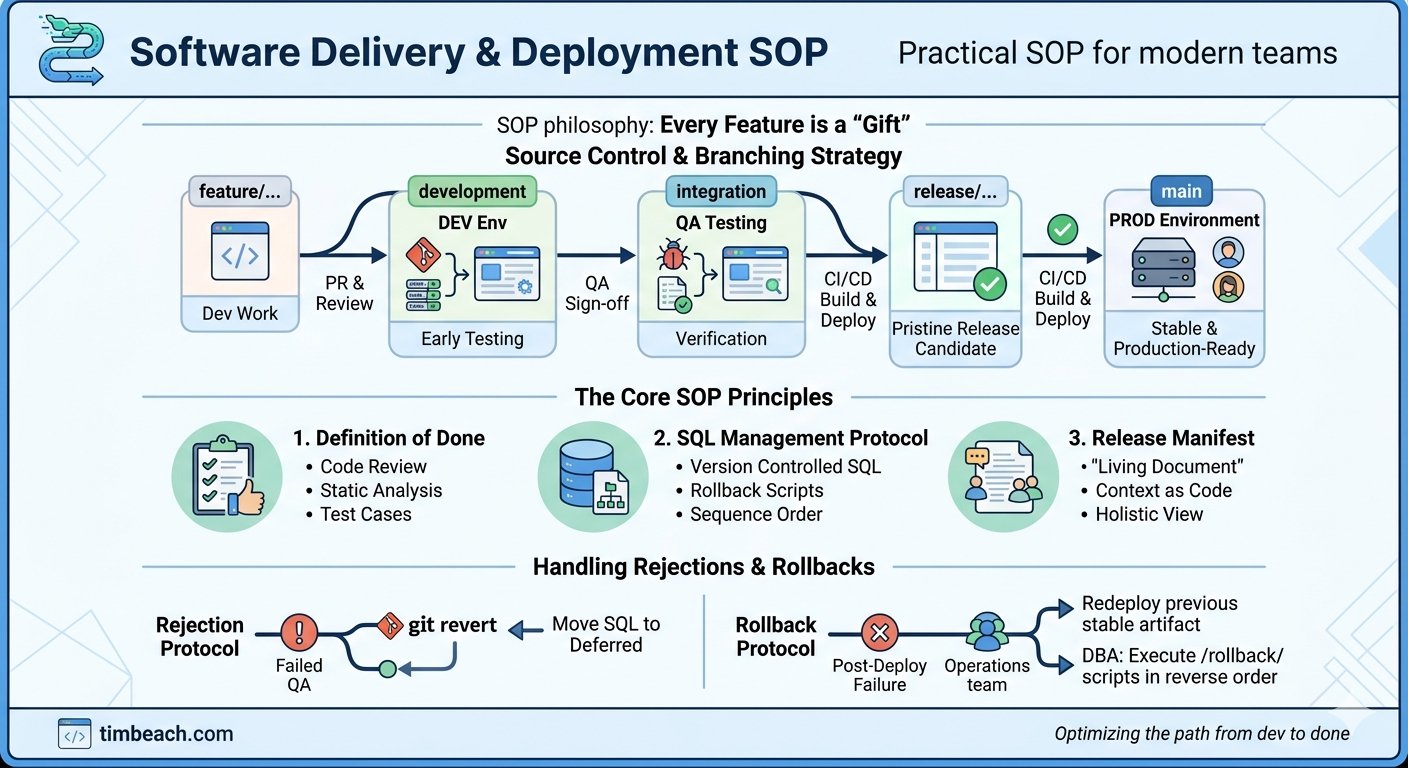
Philosophy: Every Feature is a "Gift"
Sometimes changing the language can change our perception. Imagine if a feature branch was called a gift. This idea comes from Ernie Gray.
A common challenge in software development is the gravity of the development environment. Engineers spend hours completing code that works locally, submit a PR, check that it works on the dev environment, and then feel the rest of the process is beyond their control.
Escaping the gravity of the development environment into outer orbits requires more energy.
A great team ensures their code is a polished, deployable package — a gift to the team working together toward a great release. These SOPs define what "polished and deployable" looks like.
1. Story/Feature-Level Definition of Done
Quality parts make quality systems. A consistent definition of done at the story level prevents incomplete or undocumented code from entering the pipeline.
A story is not done until all of the following are true:
- [ ] Code Review: Pull request is reviewed and approved by a teammate
- [ ] Static Analysis: Developer has reviewed the scan and addressed all issues
- [ ] SQL Archival: All required SQL is committed to the release folder in the repository and linked in the Release Manifest (see Section 5)
- [ ] Ticket Linking: The ticket contains a comment with the direct URL to any SQL files
- [ ] Feature Toggle: If the feature is high-risk, a configuration flag is implemented for instant deactivation
- [ ] Test Case: A test case is drafted in comments or the test suite, including named test users in the QA environment
- [ ] Release Manifest: The story/feature is added to the Release Manifest
- [ ] Communication: All decisions and context are documented on the ticket — not in chat threads or verbal conversations
2. Source Control and Branching Strategy
2.1 Multi-Tier Branching Model
Teams should follow a multi-tier branching model to isolate development, testing, and release preparation.
feature/PROJ-XXXX ──► development ──► integration ──► release/REL-XXXX ──► main
       │                  │                │                │                │
  Individual work     DEV env          QA testing      CI/CD builds     Always = PROD
                                       on QA env       & deploys to
                                                       PROD (pristine)
| Branch | Purpose | Deploy Target |
|---|---|---|
feature/<dev>/PROJ-XXXX-desc |
Individual work | Local / DEV |
development |
Automated builds, early integration testing | DEV |
integration |
Formal QA testing of combined features | QA |
release/REL-XXXX |
Pristine release candidate — only QA-approved code. CI/CD builds and deploys artifacts from this branch. | PROD (+ staging/perf) |
main |
Stable, production-ready code. Source of truth. Always reflects PROD. | — |
Important: Production artifacts are only built and deployed from release branches. The
developmentbranch deploys to DEV for early testing but is not a source for production artifacts.
2.2 Branch Naming
All branches must include the ticket identifier from your project tracker.
Feature branches: feature/<developer>/PROJ-XXXX-short-description
Release branches: release/REL-XXXX (sequential numbering)
2.3 Creating Branches
All new branches must be created from main.
git checkout main
git pull origin main
git checkout -b feature/<developer>/PROJ-XXXX-short-description
Why: Creating branches from main ensures that a release branch can be rebuilt easily from the sum of the individual branches included in the release.
2.4 Release Lifecycle
- A new release branch is created from
mainusing the release naming convention - Feature branches and bug fixes for that release are merged into the release branch via pull requests
- CI/CD builds and deploys artifacts from the release branch
- QA testing is performed against the deployed build; fixes go back into the same release branch
- Once the release passes QA, the release branch is merged into
main - A new release branch is created from
mainfor the next cycle
Creating a new release branch:
git checkout main
git pull origin main
git checkout -b release/REL-XXXX
git push -u origin release/REL-XXXX
Merging a completed release back to main:
git checkout main
git pull origin main
git merge --no-ff release/REL-XXXX
git push origin main
Tip: Use
--no-ff(no fast-forward) merges to preserve release branch history in the git log. This makes it easy to trace which commits belonged to which release.
2.5 Branch Ownership
Branch management is owned by the developer. Each developer is responsible for:
- Creating branches from
main - Keeping branches up to date
- Resolving merge conflicts
- Cleaning up stale branches after merge
2.6 Do's and Don'ts
| Do | Don't |
|---|---|
Branch from main |
Commit directly to main — all changes reach main through a release branch merge |
| Follow naming conventions exactly | Build or deploy production artifacts from development — it is for integration testing only |
Complete the current release merge into main before creating the next release branch |
Run parallel release branches — only one should be active at a time |
Use --no-ff merges when merging release branches back to main |
Force push to main |
| Use pull requests for all merges to shared branches | Merge unapproved features into the release branch |
3. Pull Requests
3.1 PRs to Development
- Developers can PR to the
developmentbranch at will - Merging to
developmenttriggers automated build and deploy to the DEV environment - PRs to
developmentdo not require approval but are still required (no direct pushes)
3.2 PRs to Integration
- When a feature is ready for formal QA, the developer merges it into the
integrationbranch via PR - The
integrationbranch is what the QA team deploys to the QA environment - PRs to
integrationrequire review
3.3 PRs to Release
- Only features fully signed off by QA in the integration branch are merged into the release branch
- The release branch is cut from
mainand must remain pristine — no rejected or unapproved code - PRs to release branches require review and approval
3.4 General PR Guidelines
- PR title should include the ticket identifier
- PR description should summarize what changed and why
- Link the PR to the relevant ticket
4. The Release Manifest
A wonderful side-effect of the agentic AI trend is context as code in natural language. Scientific processes are good at "breaking things into pieces" at the expense of a holistic context. Version control and project trackers tend to atomize and disarticulate. Context is easy to lose sight of.
The Release Manifest is a living document that provides a collaborative, holistic, human-readable context of the work candidates for a given release. A human (or agent) should be able to understand intent and build your software using this document.
4.1 Lifecycle
- At the outset of a sprint (or following a release), a Release Manifest is created and cross-linked with the release ticket
- Deferred features from the previous manifest are copied forward
- The document is updated incrementally as features emerge from the sprint
- At standup, the team briefly reviews the Release Manifest
- At release assembly time, all features are either Approved or Deferred, and contents are transposed into the release ticket
Important: Release tickets should not be cloned from the previous deployment. Use a clean template to avoid stale information.
4.2 Manifest Sections
| Section | Meaning |
|---|---|
| Proposed | Code complete and merged to integration branch |
| Approved | Approved by QA, static analysis reviewed, merged to release branch |
| Deferred | Not ready yet — wait until next release |
4.3 For Each Feature, Include:
- A meaningful title with the ticket key (e.g., "PROJ-1144 - Temperature Configuration")
- A short context explaining:
- What it is
- How it works
- How it's deployed (including any infrastructure components)
- Links to:
- The tracker tickets
- The feature branch
- Associated SQL files
5. SQL Management Protocol
Many organizations formally request all SQL processing via DBA tickets above the development environment. Well-organized SQL etiquette reinforces good habits and gives the acting DBA clear execution paths.
All SQL changes are version-controlled in the repository. The SQL folder serves as the source of truth, organized by release ticket ID.
5.1 Directory Structure
/releases/REL-XXXX/
├── 001_PROJ-101_DDL_CreateUserTable.sql
├── 002_PROJ-101_DML_InsertDefaults.sql
├── 003_PROJ-205_DDL_AddPrefsColumn.sql
├── rollback/
│   ├── 001_PROJ-101_UNDO_DropUserTable.sql
│   ├── 002_PROJ-101_UNDO_DeleteDefaults.sql
│   └── 003_PROJ-205_UNDO_RemovePrefsColumn.sql
└── deferred/
    └── (scripts moved here if feature is rejected by QA)
5.2 Naming Convention
Forward scripts: SequenceNumber_TicketCode_Action_Description.sql
Rollback scripts: SequenceNumber_TicketCode_UNDO_Description.sql
5.3 Each SQL Script Must Include
- The primary DDL/DML
- A verification query (e.g.,
SELECT count(*)) to confirm success - A corresponding rollback script
- Clear comments explaining what the script does
5.4 Ticket Linking
The ticket must contain a comment with the direct URL to the SQL files in the repository.
A feature is not considered complete if scripts only exist in a local environment or the development database.
6. Deployment Strategy
6.1 Developer Ownership
Deployment strategy is owned by the developer. Each developer is responsible for:
- Linking their story to the release ticket used for tracking the deployment
- Adding their feature to the Release Manifest
- Stories are not linked to the release ticket until the release branch is completed
6.2 Release Checklist
Before submitting the release for deployment approval:
- [ ] Build Artifact: Specific CI/CD artifact ID is listed (built from the release branch)
- [ ] Branch Integrity: The release branch contains only the features listed in the release ticket
- [ ] DBA Execution Order: A table lists every SQL script in exact order of execution
- [ ] QA Sign-off: Formal statement or checkbox from QA confirming the release candidate is stable
- [ ] Pre-Deployment Steps: Documented
- [ ] Post-Deployment Steps: Documented
- [ ] Static Analysis: Release branch is scanned and results are linked
7. Handling Rejections and Rollbacks
7.1 Rejection Protocol
If a feature fails QA in the integration branch:
- Perform a
git reverton the merge commit (preserves branch history) - Move corresponding SQL scripts to the
/deferred/subfolder to prevent DBA execution - Update the Release Manifest — move the feature to Deferred
7.2 Rollback Protocol
Every deployment plan must include a "Point of No Return" assessment.
If a failure occurs post-deployment:
- Operations redeploys the previous stable artifact ID
- DBA executes scripts in the
/rollback/folder in reverse sequence number order
This restores the environment to its exact previous state without guesswork.
8. Responsibilities and Timing
| Action | Responsible Party | Timing |
|---|---|---|
| Commit SQL + rollback scripts | Developer | During feature development |
| Update Release Manifest | Developer | As features are completed |
| Update release ticket | Developer | Upon merge to release candidate |
| Verify artifact ID and scripts | Lead / Scrum Master | 24 hours before submission |
| Execute deployment and SQL | Operations / DBA | Scheduled release window |
Quick Reference
| What | Rule |
|---|---|
| Branch source | Always branch from main |
| Branch naming | Must include project ticket ID |
| Post-release | Merge release branch back to main with --no-ff |
| Branching model | feature → development → integration → release → main |
| Parallel releases | No — only one active release branch at a time |
| Direct commits to main | Never — all changes reach main through release branch merge |
| Production artifacts | Built only from release branches |
| PRs to development | Required, no approval needed |
| PRs to integration | Required, reviewed — this is what QA tests |
| PRs to release | Required, approval needed — only QA-approved code |
| SQL changes | In repository /releases/REL-XXXX/ with rollback scripts |
| Release Manifest | Living document, updated by each developer, reviewed at standup |
| Release tickets | Fresh template, not cloned — assembled from Release Manifest |
| Definition of Done | Code review + static analysis + SQL archived + test case + manifest updated |
| Communication | On the ticket |
| Branch management | Developer-owned |
| Deployment strategy | Developer-owned |