Sometimes the best way to lock in a concept is to grab a marker and start scribbling. I sketched out the OSI model recently — seven layers stacked top to bottom, with a few mnemonic hints squeezed into the margins. Here's the walk-through.
What the OSI Model Actually Is
The Open Systems Interconnection model is a conceptual framework that breaks network communication into seven distinct layers. It was published by ISO back in the 1980s, and while the modern internet runs on the looser TCP/IP model, OSI is still the lingua franca for talking about networking. When somebody says "that's a Layer 7 problem" or "Layer 2 broadcast storm," they're speaking OSI.
Each layer has one job. Each layer talks to the layer above and the layer below — and in theory, only those. Data flows down the stack on the sending side, crosses the wire (or air), and flows back up the stack on the receiving side, getting unwrapped at each step.
Layer 7: Application
HTTP, SMTP, DNS, SSH
This is the layer closest to the user. Your browser, your email client, your terminal — they all live here. When you type a URL and hit enter, you're generating an HTTP request that originates at Layer 7.
Worth noting: "Application Layer" doesn't mean "the app itself." It means the protocols apps use to talk to the network. Chrome isn't Layer 7. The HTTP protocol Chrome speaks is.
Layer 6: Presentation
Encryption, compression, character encoding
This is the translator. It takes data from Layer 7 and reformats it for transmission — encrypting it (TLS lives here, conceptually), compressing it, converting between character sets like UTF-8 and ASCII.
In the real-world TCP/IP stack, this layer often gets folded into Layer 7 or handled inline by libraries. But conceptually, it's the "make this data ready to send" step.
Layer 5: Session
Conversation between two nodes — volleyball
The volleyball metaphor is the clearest one I've found. A session is a back-and-forth rally between two endpoints. Layer 5 sets up the volley, keeps it going, and ends it cleanly when the point is over.
Think SSH login sessions, RPC calls, anything where state persists across multiple message exchanges. The session layer opens, maintains, and closes those conversations.
Layer 4: Transport
Segmentation, acknowledgment, multiplexing — reliable
Now we're into the plumbing. Layer 4 is where TCP and UDP live. Its job is to break data into segments, deliver them, and — in TCP's case — make sure they actually arrived.
- Segmentation: Break the message into chunks small enough to send.
- Acknowledgment: TCP's "did you get that?" handshake.
- Multiplexing: Multiple conversations sharing one connection, sorted by port number.
When someone talks about "port 443" or "port 22," that's a Layer 4 concept.
Layer 3: Network
Packet / datagram — routing and addressing
This is IP. Layer 3 is responsible for getting a packet from Network A to Network B, possibly across a dozen routers along the way. It assigns logical addresses (IP addresses) and figures out the path.
If Layer 4 says "deliver this reliably," Layer 3 says "deliver this to that house, in that city, in that country." Routers operate at this layer.
Layer 2: Data Link
Data frames — two nodes physically connected
Layer 2 handles communication between two devices on the same physical network segment. Ethernet and Wi-Fi are Layer 2 protocols. MAC addresses are Layer 2 addresses.
Where Layer 3 worries about routing a packet across the internet, Layer 2 worries about getting a frame across a single hop — your laptop to your router, your router to the cable modem. Switches operate here.
Layer 1: Physical
Let's get physical — raw bitstreams
The wire. The radio wave. The fiber optic pulse. Layer 1 is the actual electrical, optical, or radio signal carrying ones and zeros.
No addressing here, no framing, no protocol logic — just voltage, frequency, and timing. Cables, connectors, hubs, repeaters, and the spec of "what does a 1 look like on this medium?" all live at Layer 1.
Memorizing the Stack
The classic mnemonics:
- Top down: All People Seem To Need Data Processing.
- Bottom up: Please Do Not Throw Sausage Pizza Away.
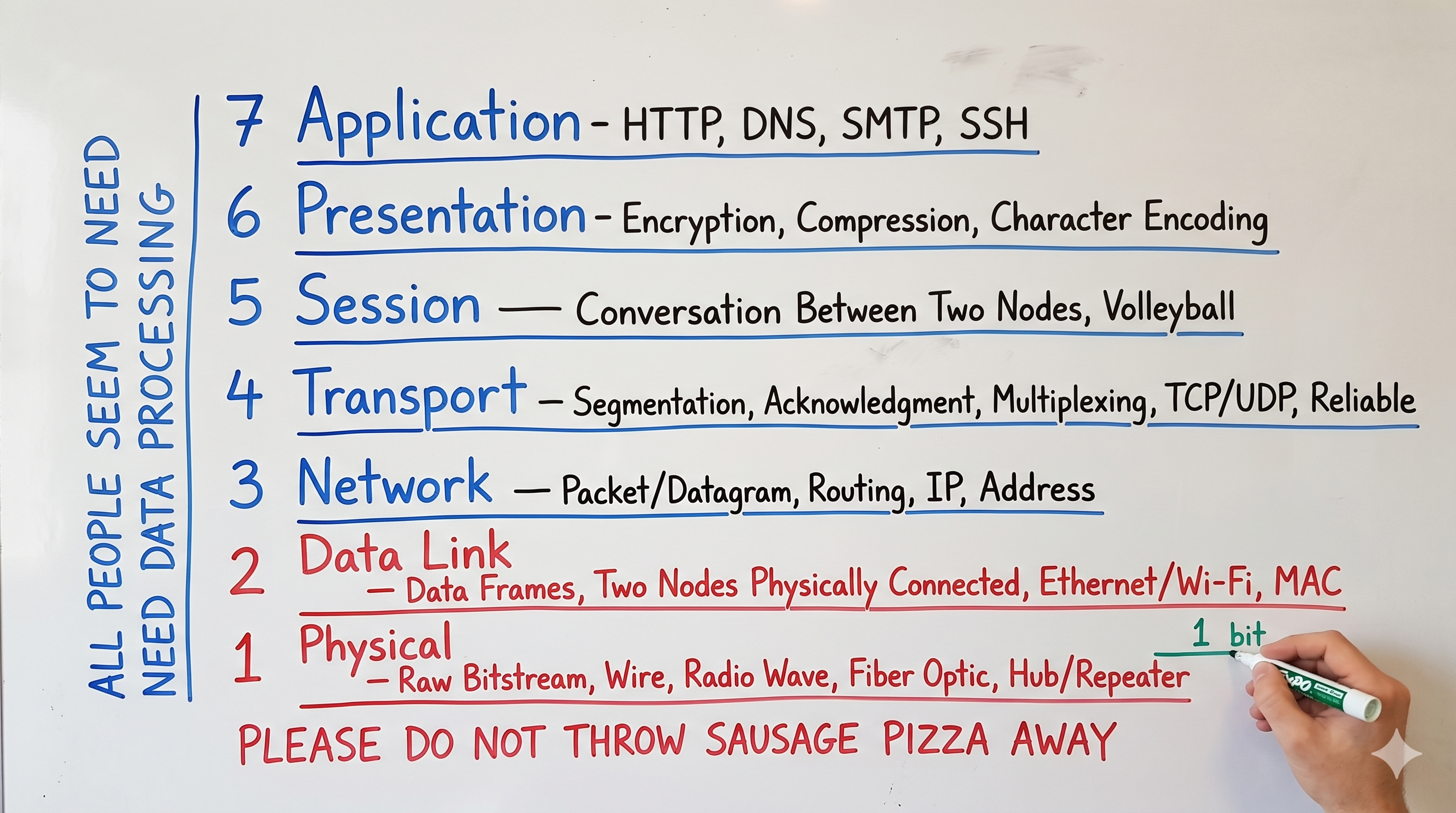
Pick whichever sticks. Personally, I find the pizza one harder to forget — and the bottom-up direction matches the way data actually arrives at your machine: photons and voltages first, application semantics last.
Why It Still Matters
Most production debugging is OSI-flavored, even when nobody calls it that. "DNS isn't resolving" is Layer 7. "TLS handshake failing" straddles 6 and 7. "Connection refused" is 4. "No route to host" is 3. "Link is down" is 1 or 2. Knowing which layer to investigate first is half the job.
The OSI model isn't a precise description of how networks actually work — TCP/IP collapses some of these layers and ignores others. It's a thinking tool. A way to decompose a fundamentally messy problem into manageable slices. Once it clicks, you start seeing it everywhere.