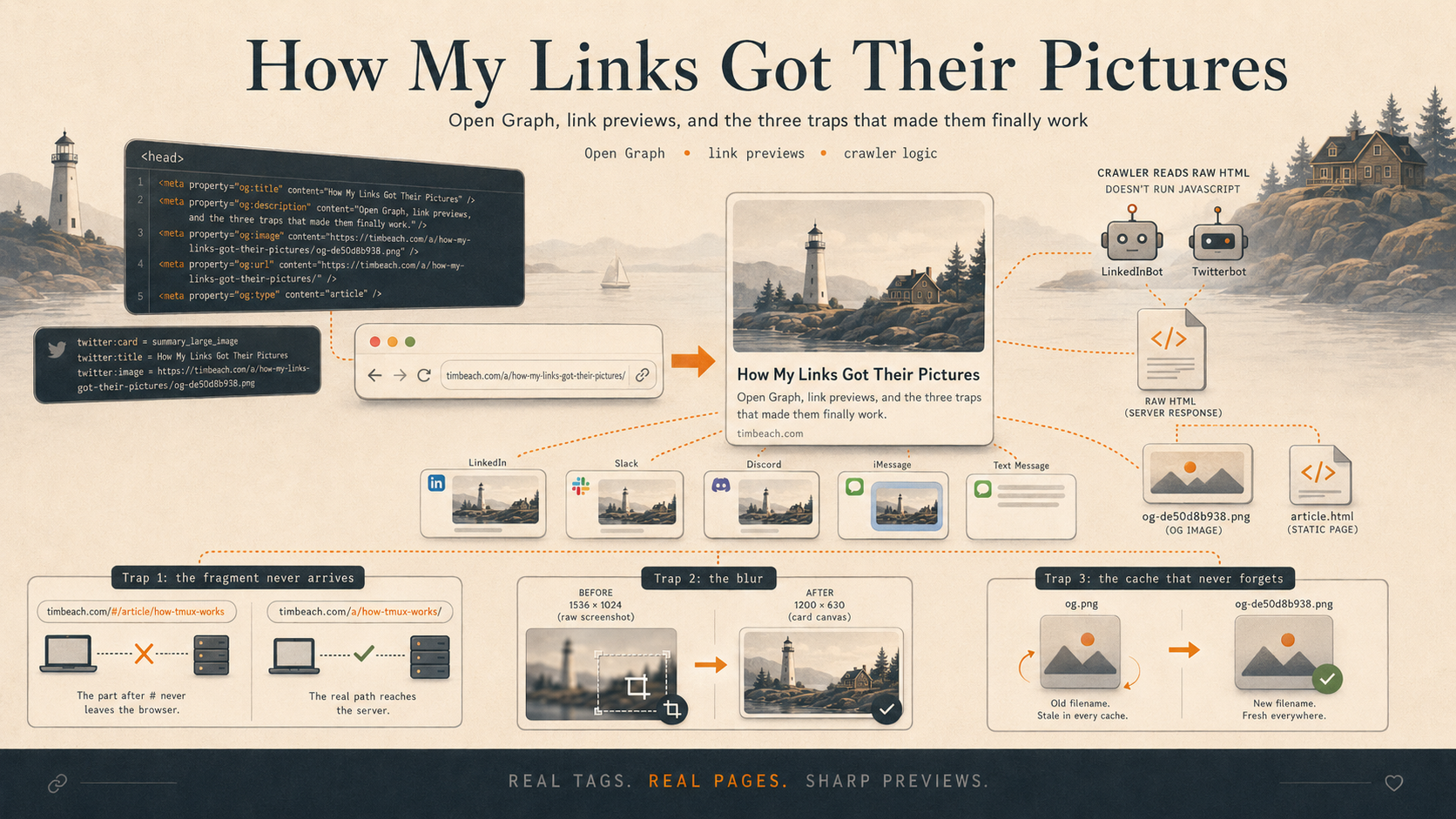
Paste a link to this site into LinkedIn, or Slack, or a text message, and a little card unfurls: a title, a sentence, and a picture. That card is doing a lot of quiet work — it's the difference between a friend tapping your link and a friend scrolling past a naked blue URL.
For a long time, every link to this site unfurled with the same picture — a generic photo of me that had nothing to do with whatever article I was actually sharing. This is the story of the protocol that fixes that, and the three traps I fell into making it work on a site like mine.
🔗 The protocol nobody told you about
The technology is called the Open Graph protocol, and you've been looking at its output for years without knowing its name. Facebook published it in 2010 so that a shared link could carry a title, a description, and an image into the news feed. It caught on, and now essentially every platform that renders a "link preview" — LinkedIn, X, Slack, Discord, iMessage, WhatsApp, Signal — reads the same tags.
The tags live in the <head> of your HTML, and they're almost insultingly simple:
<meta property="og:title" content="How My Links Got Their Pictures" />
<meta property="og:description" content="The protocol behind every link preview, and three traps I hit." />
<meta property="og:image" content="https://timbeach.com/a/how-my-links-got-their-pictures/og.png" />
<meta property="og:url" content="https://timbeach.com/a/how-my-links-got-their-pictures/" />
<meta property="og:type" content="article" />
That's it. og:title, og:description, and og:image are the three that matter; the others are polish. There is no JavaScript, no API, no SDK. You write five lines of HTML and the entire internet's worth of chat apps suddenly know how to show your link off.
🐦 Twitter wanted to be different
X — Twitter, when this all started — decided it needed its own parallel set of tags, prefixed twitter: instead of og::
<meta name="twitter:card" content="summary_large_image" />
<meta name="twitter:title" content="How My Links Got Their Pictures" />
<meta name="twitter:image" content="https://timbeach.com/a/how-my-links-got-their-pictures/og.png" />
The one that does real work is twitter:card. Set it to summary_large_image and you get the big edge-to-edge picture instead of a cramped thumbnail. The good news is that Twitter falls back to your Open Graph tags for anything it can't find a twitter: version of — so in practice you write the og: tags, add twitter:card on top, and you're covered everywhere. I emit both on every page, belt and suspenders.
One quirk worth knowing: since around 2023, X often renders link cards as just the image with the domain stamped on it, dropping the title and description text that LinkedIn shows. That's a display choice on their end, not a mistake in your tags. Your picture still shows up large.
🤖 The crawler doesn't run your code
Here is the single most important fact about Open Graph, and the one that caused all my grief: the thing reading your tags is a dumb robot, not a browser.
When you paste a link, the platform sends out a crawler — LinkedIn's is called LinkedInBot, Twitter's is Twitterbot — to fetch your page. That crawler downloads the raw HTML and reads the meta tags. It does not run your JavaScript. It does not wait for your single-page app to boot, fetch data, and render. It reads what the server hands it, on the first byte, and leaves.
For a normal website with real HTML pages, this is fine. For my site, it was a disaster, and to explain why I have to admit how this site is built.
🪤 Trap one: the fragment that never arrives
timbeach.com is a single-page app. Every article lives at a URL like timbeach.com/#/article/how-tmux-works. That # is a hash fragment, and the site's router watches it to decide which article to show — all in the browser, all in JavaScript.
Here's the problem, and it's baked into the web itself: the part of a URL after the # is never sent to the server. It's a client-side-only construct, by design, going back to the original purpose of fragments as "jump to this anchor on the page." So when LinkedIn's crawler fetches timbeach.com/#/article/how-tmux-works, the server only ever sees a request for timbeach.com/. The crawler gets my homepage, reads the homepage's generic OG tags, and shows that same generic photo of me — no matter which article the link pointed to.
Two strikes, both fatal: the crawler can't run the JavaScript that would pick the right article, and it can't even see which article was requested. There is no clever tag I could add to fix this. The hash URL is a dead end at the protocol level.
The fix is to stop asking a hash URL to do a server's job. At deploy time, a script now walks every article and writes a real, honest HTML file at a real path — a/how-tmux-works/index.html — with that article's own Open Graph tags baked in. That's a page the crawler can actually fetch and read. A human who clicks it gets a one-line redirect into the usual single-page reader, so the experience is unchanged; only the URL you share is different. Crawlers read the static tags; people land in the app. Everybody gets what they came for.
🌫️ Trap two: the blur
I shipped the share pages, pasted a link, and there it was — the right article's image, finally. Except it was blurry.
The culprit was aspect ratio. Open Graph images want to be 1200×630 pixels — a specific, slightly-wider-than-2:1 rectangle. The image I'd handed it was a 1536×1024 screenshot. When the crawler gets an image that isn't the right shape, it crops and resamples it to fit, then re-encodes the result as a compressed JPEG. For a screenshot full of small text, that round of squashing and recompression turns crisp pixels to mush.
Worse, a couple of my images were smaller than 1200 pixels wide, and platforms will quietly demote an undersized image — showing it as a tiny thumbnail off to the side instead of the big card. Same tags, completely different result, purely because of pixel dimensions.
The fix was to stop handing crawlers raw images and start handing them finished cards. Now the publish pipeline composites every article's image onto an exact 1200×630 canvas — the whole image, scaled to fit, centered on a dark background that matches the site, downsampled once with a good filter. The crawler receives something already the precise shape and size it wants, so it has nothing left to crop or resample. The blur is gone, and a square diagram or an undersized photo gets the same clean treatment as a perfect screenshot.
♻️ Trap three: the cache that never forgets
This one is the cruelest, because everything was working when it bit me.
I'd been iterating — first a plain text card, then the real image, then the sharp composited version — and each time I redeployed and re-checked the preview. At one point the preview reverted to showing an old version I thought I'd deleted two iterations ago. The file on my server was unambiguously the new one; I checked the bytes by hand. And yet LinkedIn kept showing the stale one.
Platforms cache Open Graph images aggressively, and they cache them by URL. My image had lived at the same URL the whole time — .../og.png — while its contents changed underneath. LinkedIn had fetched that URL early, stored the bytes, and from then on it served its copy without ever asking my server whether the image had changed. Re-scraping the page refreshed the tags but not the cached image. The URL was the cache key, the URL never changed, so the cache never expired.
The fix is a trick as old as web development: put a fingerprint of the contents into the filename. The card is now named after a hash of its own bytes — og-de50d8b938.png — so the moment the image changes, its filename changes, and therefore its URL changes, and therefore every cache on earth treats it as a brand-new image it's never seen. When nothing changes, the name stays put and the cache stays valid. You only bust the cache exactly when you mean to.
🌟 The whole trick, in one breath
Open Graph is a beautiful little protocol: five lines of HTML buy you a polished presence in every chat app and feed on the internet. But it rests on one assumption — that a crawler can fetch a real page and read real tags — and the moment your site bends that assumption, you find out exactly how much was riding on it.
If you take three things from my bruises:
- Crawlers don't run JavaScript. If your content only exists after your app boots, the crawler will never see it. Serve real HTML with real tags at a real URL.
- Hand over a finished 1200×630 image, not a raw one. Let the crawler do as little as possible, and it can't make your picture worse.
- Fingerprint the filename so the URL changes when — and only when — the image does. Otherwise some cache, somewhere, will haunt you with a picture you killed days ago.
I added a read-aloud voice to this blog last month and learned that two parsers will always eventually disagree. This month I learned that a crawler is just a very literal reader who refuses to run your code, resizes your art without asking, and never throws anything away. Build for that reader, and your links will finally look like they mean something.