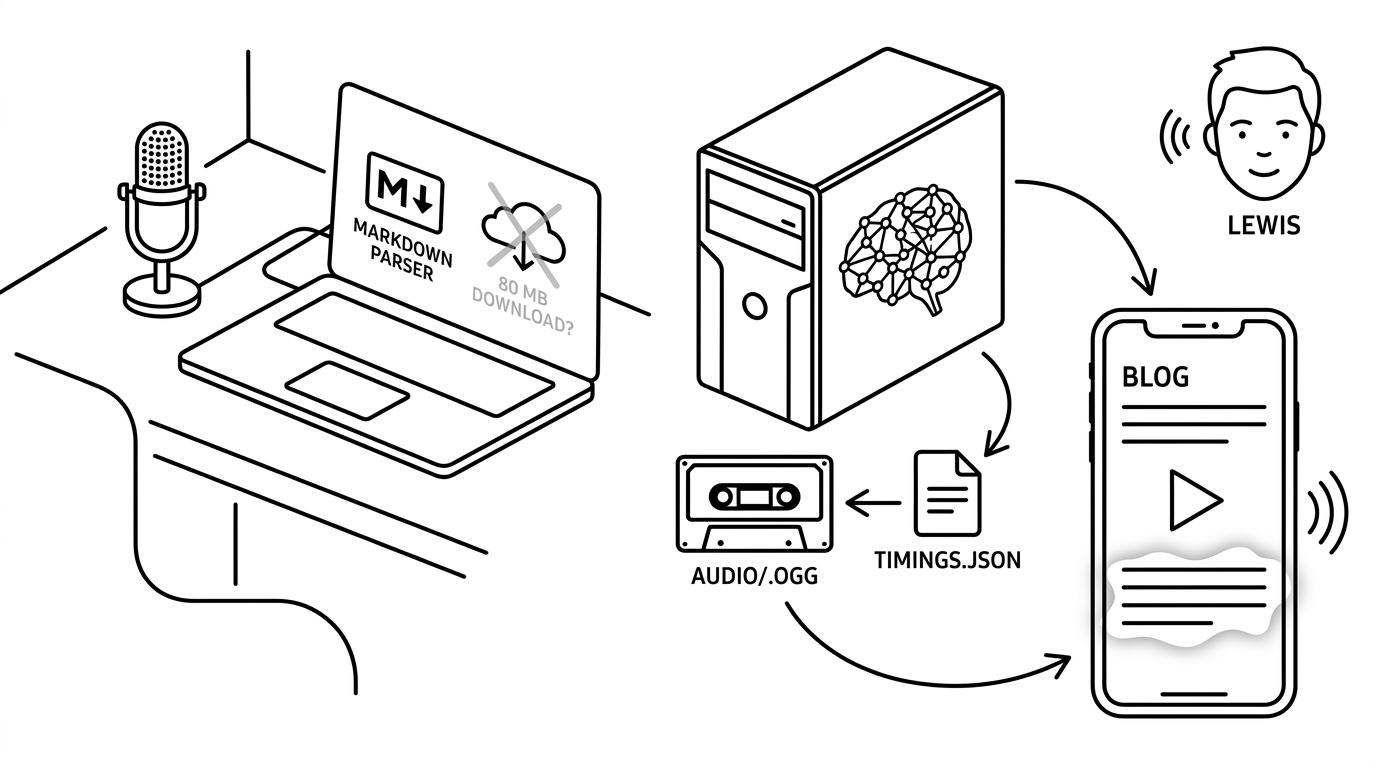
Click ▶ read aloud at the top of this article. A British man named Lewis is going to read it to you. He works for me now.
This is a story about how I got there, and about all the wrong turns I took along the way. If you're considering adding text-to-speech to your site, please learn from my mistakes — there are at least four of them.
🎤 The first attempt: Web Speech
The Web Speech API has been built into browsers for over a decade. You hand speechSynthesis.speak() a string, the browser figures out a voice and reads it aloud. No download, no library, no API key. It is the easiest possible way to add TTS to a webpage.
I wired it up in maybe twenty lines. It worked beautifully on macOS. It worked on Windows. It worked on Android. Then I opened my own site in my own browser — Brave, on Aegix Linux — and the voice list came back empty. No audio. No error. Just silence.
It turns out that on Linux, the browser's "speech synthesis" is a thin wrapper around a system service called speech-dispatcher, which in turn shells out to espeak-ng (or Festival, if you're feeling vintage). If you don't have those installed — which most desktop Linux distros don't, by default — your browser knows zero voices, and the API politely returns nothing.
This was annoying for me personally, because I am the entire Linux audience for my own blog, and I was apparently locked out of my own read-aloud feature. But it would have been annoying for any of my visitors on Linux too, and I wasn't about to ship "install these three packages first" as a UX.
🐌 The second attempt: WASM in the browser
Fine, I thought. If the browser's native TTS can't be relied upon, I'll bring my own. Kokoro is a lovely open-source neural TTS model — small (82 million parameters), fast for its size, and there's a JavaScript port that runs entirely in the browser via WebAssembly. No system dependencies. Works in any browser anywhere.
The download is ~80 MB. That's a lot. But it's a one-time hit, cached in IndexedDB. Once you've heard one article, the rest are free. I added a button that said HQ · ~80MB, made the model load with a progress bar, and shipped it.
It was sublime. For about thirty seconds.
The first paragraph rendered fine. The model loaded, made some confident claims about what Lewis sounded like, and started reading. Then, somewhere in the middle of the second paragraph, Brave threw up a dialog that said "This page is not responding." The model was synthesizing the next paragraph in the background — on the same thread the browser uses to fire audio events and repaint the screen — and the synthesis was taking long enough that the watchdog assumed the tab had hung.
I moved the synthesis into a Web Worker. The unresponsive dialog went away. But now there were multi-second gaps between paragraphs, because synthesizing each new paragraph took about as long as the previous paragraph's audio took to play. The "look-ahead" pipeline that was supposed to prepare the next paragraph in advance couldn't get ahead. It was a real-time-factor problem: my laptop is fast, but it isn't that fast, and other people's laptops are often slower than mine.
I sat with this for an evening, and eventually said it out loud: I am asking every reader's CPU to do work that I should be doing once, on my own machine.
📼 The pivot: render once, ship the bytes
The realization is dumb in retrospect. Audio doesn't have to be live. I publish articles by hand, one at a time, on my own laptop. There is exactly one moment per article when I need TTS — at publish time — and exactly one machine that needs to do the work — mine.
So now, when I publish an article, a Python script splits the markdown into paragraphs and feeds each one through Kokoro running locally. The samples get concatenated, encoded as Opus at 64 kbps mono, and saved as audio/<slug>.ogg. Alongside it, a tiny audio/<slug>.timings.json records the start and end timestamp of every paragraph. Both files get rsynced to the server with the rest of the site.
The browser then does almost nothing. It sees the audio path in the article metadata, attaches a native <audio> element, and plays. As currentTime advances, a timeupdate listener finds which paragraph the playhead is in and adds a tts-reading class to its DOM element. That's how the highlighted line glows as Lewis reads it. There are no models, no workers, no WebAssembly. Just a 3 MB Opus file and a 13 KB JSON sidecar.
It works on every browser on every operating system. No 80 MB download. No "page not responding." The highlight is exact, because the timestamps were measured at synthesis time — not estimated client-side.
The whole TTS-related code in the page is about 130 lines. The thing it replaced was almost 700.
🪤 The traps the parsers hid
Two bugs hit me on the way to shipping, and I want to flag them because they're shaped the same way: two different markdown parsers disagreeing about what counts as a paragraph.
The site has a custom JavaScript markdown parser, and the Python render pipeline uses markdown-it-py. They're supposed to produce the same paragraph structure for the same input, because the highlight needs paragraphs[idx] on the server side to refer to the same DOM element on the client side. They didn't always agree.
Trap one. My JS parser maps # Title to <h2>, not <h1>. (I have no idea why past-me thought this was a good idea. Past-me is not available for comment.) markdown-it-py, being CommonMark-compliant, maps # to <h1>. So the article title was counted as a paragraph on the client and skipped on the server. One element off, every time. The fix was to make the client's TTS selector skip <h2>, mirroring the server skipping <h1> — which works because in this codebase, <h2> is always the article title.
Trap two. When I wrote the dream notes article, I used a verse-style format with one short sentence per line, separated by single newlines. CommonMark treats those lines as one paragraph with soft breaks. My JS parser treats every line as its own paragraph. So Python saw 52 paragraphs and the browser saw 110, the runtime sanity check fired, and the read-aloud button silently refused to open. The fix was to rewrite the article using \n\n between every line. Both parsers now agree.
The deeper lesson: when two systems both parse the same input, you eventually find out they parse it differently. I added a --validate mode to the render tool that flags timings vs. markdown drift, and a gate in deploy.sh that aborts if any article's audio is stale. That catches "I edited an article and forgot to re-render," which is the most common future failure mode. It does not catch parser-disagreement bugs of the kind I just described — for that, you'd need to run both parsers from the same harness and diff their output. I'm leaving that as a future project.
🌟 Why this is actually better
I started out trying to give my Linux readers parity with my macOS readers. What I ended up with is something better than either.
Every reader gets the same voice. Every paragraph highlights at exactly the right moment. The audio loads progressively from a static file, which the browser is excellent at. There's no compute on the reader's device, no model to download, no system service to install. The whole feature degrades gracefully — articles that don't have audio (because I haven't re-rendered them, or because rendering failed) simply don't show the read-aloud button.
And the voice is good. bm_lewis is a British-accented neural TTS voice that takes itself seriously. It sounds like the audiobook narrator for a book on, say, Jungian dream interpretation. Which is convenient, because I just wrote one of those.
🐉 What I'd do differently
Less, mostly.
The Web Speech experiment took a few hours. The WASM-in-browser experiment took several days, including an entire branch of work — engine abstractions, look-ahead queues, IndexedDB caching, jsDelivr fallbacks, _pendingResumeIdx, _keepAlive intervals to work around a Chrome bug — that I deleted in a single commit when I switched to pre-rendering. I built a sophisticated solution to the wrong problem. The correct realization — that I publish articles by hand and could just render them by hand too — was sitting there the whole time.
The hard part wasn't the engineering. It was noticing that a constraint I'd accepted (TTS has to be live in the browser) was self-imposed. Once I let go of it, the implementation got smaller, faster, and more reliable in the same edit.
If you're building something where you find yourself defending a complicated piece of infrastructure on someone else's behalf — every reader's CPU should run inference so that... — try the version where you do that work once, on your own machine, and ship the bytes. You will probably be surprised how often it's enough.
Now press play, and let Lewis take it from here.