For years, cron and I had an understanding. I'd hand it a line — a backup at 2am, a cert renewal on the first of the month — and it would do the thing, forever, without ever being thought about again. The best kind of tool: one you forget you're relying on. What I never noticed is that every one of those jobs lived on a server — a machine whose whole purpose is to never turn off. Cron kept its promises because I'd only ever asked it to keep them somewhere the lights never go out.
Then I gave cron a job on my laptop, and it quietly broke its word.
Cron is a clock, not a calendar
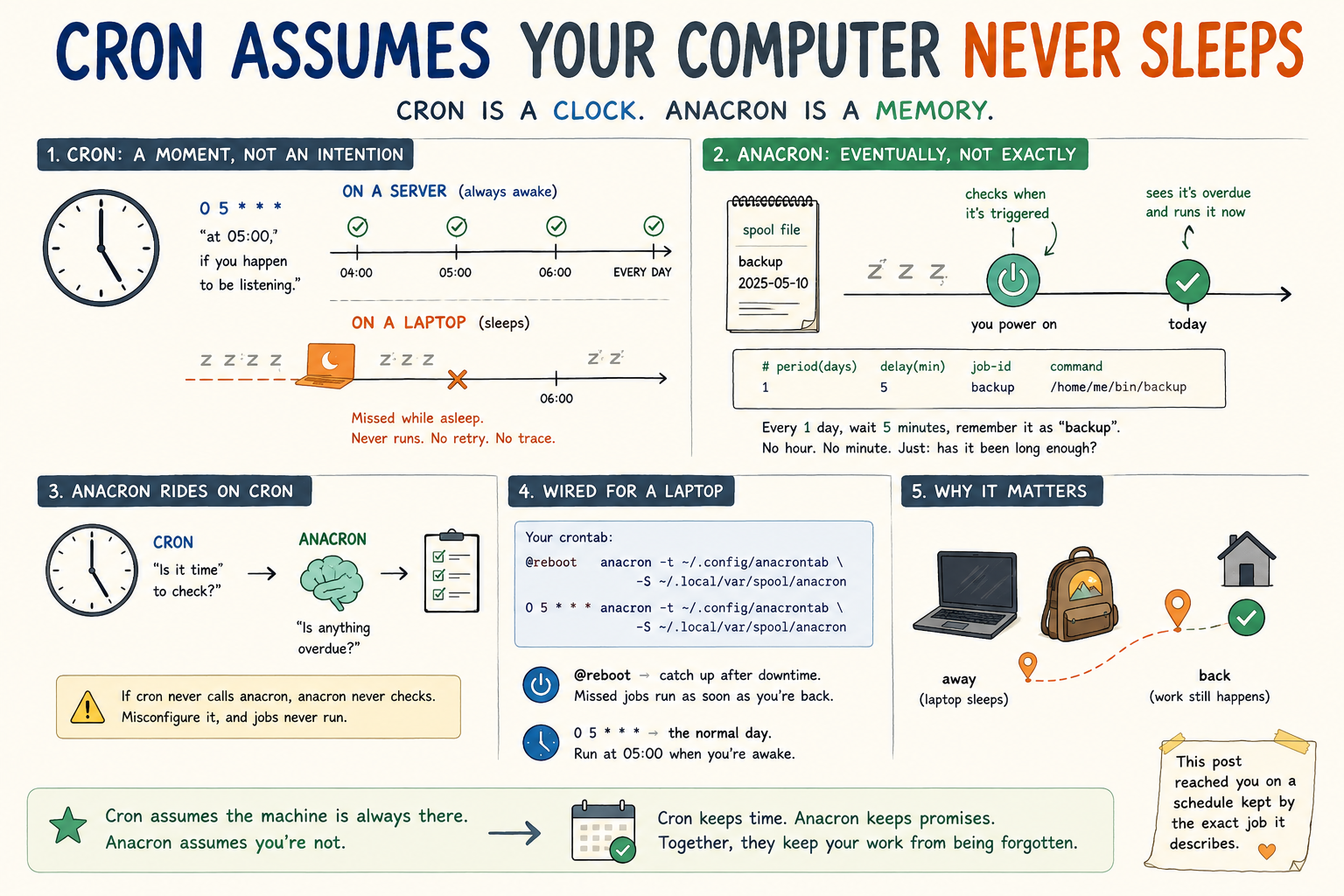
A cron entry is a moment, not an intention. 0 5 * * * doesn't mean "once a day" — it means "at 05:00, if you happen to be listening." Cron wakes every minute, checks whether the wall clock matches any of its lines, and runs what does. That's the whole model.
On a server it's a distinction without a difference: the clock always strikes 5 and the machine is always there to hear it. On a laptop the gap opens up. Close the lid at midnight and your 5am job doesn't run late — it doesn't run at all. Cron never circles back, because from its point of view nothing was ever scheduled to happen during a minute it wasn't awake to see. No error, no retry, no trace. Just a backup that silently didn't occur.
Cron doesn't run your job daily. It runs your job at a moment, and trusts that you'll be there to catch it.
The silence is the dangerous part. A job that fails loudly gets fixed. A job that simply never fires can go unnoticed until the day you reach for the thing it was supposed to have been doing all along.
anacron remembers
anacron is the answer, and it's been sitting in the repos the whole time. It's built for exactly the machine cron ignores: one that powers off.
The trick is that anacron doesn't think in clock times at all. It thinks in elapsed days. For each job it keeps a little timestamp file recording when that job last ran. Whenever anacron gets a chance to look, it asks one question per job — "has it been at least N days since this last ran?" — and if the answer is yes, it runs it now, late or not. A job missed because the laptop was shut doesn't vanish; it runs shortly after the lid comes back up.
An anacrontab line trades cron's five time-fields for three plainer ones:
# period(days)  delay(min)  job-id    command
1               5           backup    /home/me/bin/backup
"Every 1 day, wait 5 minutes after you're triggered, and remember this one under the name backup." No hour, no minute — because anacron's promise isn't when, it's eventually, and soon.
The part nobody mentions: anacron rides on cron
Here's the bit that tripped me up, and that most quick explainers skip: anacron is not a daemon. It doesn't sit in the background waiting. It runs once — checks what's overdue, runs it, exits. Which raises the obvious question: if it's not always running, what starts it?
Two things, traditionally: the machine booting, and a periodic nudge while it's up. And that periodic nudge is, almost always… cron. On many distributions anacron is literally kicked by an /etc/cron.hourly entry. So anacron doesn't replace cron — it sits on top of it. Cron answers "is it time to check?"; anacron answers "is anything overdue?"
That has a sharp edge if you get it backwards. Wire anacron to fire only at boot, and on a machine that stays up for weeks anacron never gets invoked — so your "daily" job never runs at all. The thing built to make jobs more reliable will, misconfigured, make them never happen. You still need a cron tick to poke it.
Wiring it up for a personal machine
You don't need root or the system anacron to get this. Point anacron at your own table and spool with -t and -S, and drive it from your user crontab:
@reboot   anacron -t ~/.config/anacrontab -S ~/.local/var/spool/anacron
0 5 * * * anacron -t ~/.config/anacrontab -S ~/.local/var/spool/anacron
Two triggers, two jobs. The 0 5 * * * line is the ordinary day — on a machine that's awake at 5am, that's when your work runs. The @reboot line is the safety net: come home from a week away, power on, and the first thing that happens is the overdue job finally running. Between them you get a predictable morning time and catch-up after downtime — the two things cron alone can't give a laptop at once.
My own reason for going down this road: this very site schedules its articles by date, and the RSS feed only rebuilds when I deploy — from my laptop. A small job notices when a post has come due and ships it. With plain cron, a post dated to a travel day would just… miss, and sit unpublished until I happened to redeploy by hand. With anacron, it goes out the morning I'm back online instead of never.
Why bother
Cron's assumptions are a server's assumptions: infinite uptime, an unblinking clock, someone always home to answer the door. A personal machine is the opposite of all three. It sleeps when you sleep, travels when you travel, and spends more hours dark than lit. anacron is just cron with that fact admitted up front — and once you've seen the difference, every "daily" job on a laptop that's really a "daily, if I'm lucky" job starts to itch.
I'd run cron for a decade and never met anacron, because servers never gave me a reason to. The reason, it turns out, was sitting closed on my desk the whole time.
And the small, pleasing irony: this post reached you on a schedule kept by the exact job it describes.