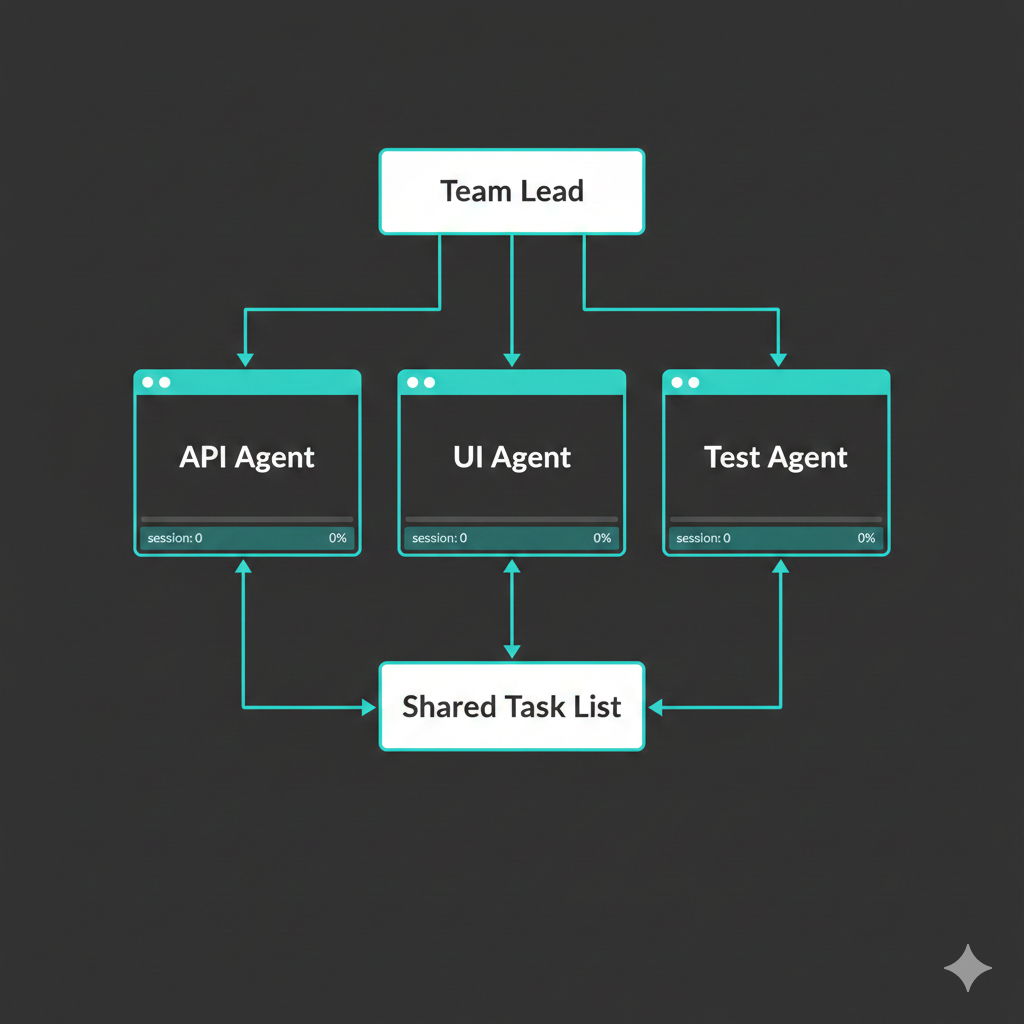
You're staring at a feature that touches the API, the frontend, and the test suite. Three separate concerns, three separate contexts, and one of you. You could work through them sequentially — endpoint first, then component, then tests — context-switching each time, holding the whole architecture in your head at once. Or you could do what any reasonable engineering manager would do: delegate. Tell three specialists to work in parallel, coordinate through a shared task list, and synthesize the results when they're done.
Claude Code agent teams let you do exactly that. You spawn multiple Claude instances — each in its own tmux pane, each with its own context window, each working on a discrete piece of the problem. They message each other, share a task board, and report back to you. It's pair programming scaled sideways.
This guide walks you through setup, first launch, architecture, practical patterns, and the safety model. By the end, you'll have a one-word alias that turns a single Claude session into a coordinated team.
Prerequisites
You need three things:
- Claude Code installed and working (
claudecommand available in your shell) - tmux installed (
tmux -Vto check — any recent version works) - Two settings in your Claude configuration file
Add the following to ~/.claude/settings.json (create the file if it doesn't exist):
{
  "env": {
    "CLAUDE_CODE_EXPERIMENTAL_AGENT_TEAMS": "1"
  },
  "skipDangerousModePermissionPrompt": true
}
If the file already exists with other settings, merge these in. The env block enables the experimental teams feature. The skipDangerousModePermissionPrompt setting suppresses the confirmation dialog that appears each time you launch Claude with --dangerously-skip-permissions — without it, you'd have to click through a warning on every team session start. We'll discuss the safety implications of that flag at the end.
The Alias
The full launch command is verbose. Let's fix that. Add this alias to your shell configuration (e.g., ~/.bashrc, ~/.zshrc, or wherever you keep aliases):
alias teamz="claude --dangerously-skip-permissions --teammate-mode tmux"
Two flags, each doing something specific:
--dangerously-skip-permissions— bypasses all permission prompts. Teammates inherit this, which means they can run commands, edit files, and take actions without asking you first. This is what makes autonomous parallel work possible.--teammate-mode tmux— tells Claude to spawn each teammate as a separate process in its own tmux pane, rather than running them all in a single process.
Reload your shell config (source ~/.bashrc or open a new terminal), and you're ready.
Quick Start
1. Get into tmux
Teammates spawn as tmux panes, so you need to be inside a tmux session first:
tmux new -s work
Then navigate to your project:
cd ~/code/my-project
teamz
What if you're not in tmux? Claude falls back to in-process mode — all teammates run inside your single terminal. You can cycle through them with
Shift+Downand toggle the task list withCtrl+T. It works, but you lose the visual parallel layout that makes teams powerful.
2. Describe what you want
Once Claude is running, just tell it what you need in plain language:
Create an agent team with 3 teammates:
- backend-dev: implement the REST API endpoints
- frontend-dev: build the React components
- tester: write integration tests for both

Have them coordinate through the task list. Require plan approval before implementation.
Claude — now acting as team lead — will:
- Create the team with a config file at
~/.claude/teams/{team-name}/config.json - Create a shared task list at
~/.claude/tasks/{team-name}/ - Spawn each teammate in its own tmux pane
- Assign initial tasks and begin coordinating
Within seconds, your terminal splits into panes. Each teammate starts working.
3. Watch, navigate, intervene
Standard tmux navigation applies:
| Action | Keys |
|---|---|
| Move between panes | Ctrl+B, then arrow keys |
| Zoom one pane full-screen | Ctrl+B, then z (toggle) |
| Resize panes | Ctrl+B, then Alt+arrow |
| Click into a pane | Just click (if mouse mode is on) |
You can read any teammate's output, and if you click into their pane, you can type messages directly to them. The team lead pane (your original session) is where you issue high-level instructions.
How It Works
Architecture
Team Lead (your main Claude session)
  ├── Teammate 1 (tmux pane) ──┐
  ├── Teammate 2 (tmux pane) ──┼── Shared Task List (~/.claude/tasks/)
  └── Teammate 3 (tmux pane) ──┘
              ↕ messaging ↕
Four moving parts:
- Team lead — your original Claude session. It creates the team, defines tasks, spawns teammates, and synthesizes results. This is the only session you interact with directly (unless you click into a teammate's pane).
- Teammates — independent Claude processes, each with its own context window. They don't share memory with the lead or with each other — they communicate through messages and the task list.
- Task list — JSON files on disk at
~/.claude/tasks/{team-name}/. Every agent can read and write to it. Tasks have statuses (pending,in_progress,completed), owners, dependencies, and descriptions. This is the coordination backbone. - Messaging — agents send direct messages to each other by name. No polling, no shared state beyond the task list. The lead gets notified when teammates finish tasks or need help.
What teammates inherit (and what they don't)
Each teammate automatically receives:
- Your project's
CLAUDE.mdinstructions - Configured MCP servers
- Available skills and plugins
- The spawn prompt from the lead (their specific assignment)
What they do not get: the lead's conversation history. If context matters for a task, the lead needs to include it in the spawn prompt or in a message. This is by design — it keeps each teammate's context window focused on their specific job rather than polluted with unrelated conversation.
Common Patterns
Parallel feature development
The most natural use case. You have a feature that spans multiple concerns:
Build the notification system:
- API teammate: design the notification service and REST endpoints
- UI teammate: build the notification bell component and dropdown
- DB teammate: create the migration and notification model

Have them agree on the notification schema before implementing.
The key phrase is "agree on the schema before implementing." Teammates can message each other directly — the lead doesn't have to relay everything. The DB teammate can share the schema with the API and UI teammates, and they can coordinate without you in the loop.
Parallel debugging
Four eyes are better than two. Twenty are better still:
Users report the app crashes on login. Spawn 4 teammates to investigate:
- One checks the auth middleware
- One examines recent database migrations
- One reviews the session handling code
- One searches error logs and stack traces

Have them share findings and narrow down the root cause together.
Each investigator works a different angle simultaneously. When one finds something relevant, they message the others. The lead synthesizes the findings into a diagnosis.
Multi-angle code review
A single reviewer catches bugs. Multiple reviewers with different mandates catch categories of bugs:
Review PR #42 from three angles:
- Security reviewer: check for injection, auth bypass, data exposure
- Performance reviewer: check for N+1 queries, unnecessary re-renders, missing indexes
- Test reviewer: verify coverage, edge cases, and assertion quality

Synthesize their findings into a single review.
Research and design exploration
Not all teamwork is about code. Sometimes you need perspectives:
I'm designing a CLI tool for managing environment variables across projects.
Create a team to explore this:
- UX researcher: how do developers actually manage env vars today? What's painful?
- Architect: propose the data model, storage format, and CLI interface
- Devil's advocate: find the edge cases, challenge assumptions, identify where this breaks
Controlling the Team
Message a specific teammate
Message the backend-dev teammate: "Prioritize the auth endpoints — the frontend needs them first."
Assign or reassign tasks
Assign the caching task to the backend-dev teammate.
Tasks can also have dependencies — "don't start the integration tests until the API endpoints are done" — which the lead manages through the task list.
Require plan approval
For high-stakes work, you can put teammates in plan mode. They research and propose a plan, then wait for your explicit approval before writing any code:
Spawn an architect teammate to refactor the auth module. Require plan approval before any changes.
The teammate will explore the codebase, write up a plan, and send it to you. You review it, approve or reject with feedback, and only then do they start implementing. This gives you architectural control without micromanaging the implementation.
Shut down teammates
When work is done:
Ask the tester teammate to shut down.
Or wind down everything:
Shut down the team and clean up.
This removes the team config and task list files. The tmux panes close.
Choose models for teammates
Not every task needs the most capable (and expensive) model. You can specify:
Create a team with 3 teammates using Sonnet for cost efficiency.
Use Opus for complex architectural work, Sonnet for straightforward implementation, Haiku for simple lookups and formatting. The lead can mix models across teammates.
Tips and Troubleshooting
Getting the granularity right
Task size is the single biggest factor in team effectiveness. Too small and you drown in coordination overhead — agents spend more time messaging than working. Too large and teammates go dark for long stretches, potentially duplicating effort or heading in the wrong direction.
The sweet spot: self-contained units of work. A module. A test file. An API endpoint with its route, controller, and validation. Aim for roughly 5–6 tasks per teammate per session. Each task should be something a teammate can complete without needing to ask three clarifying questions.
Token economics
Each teammate gets its own context window. Three teammates means roughly 3x the token usage of a single session — there's no sharing or deduplication of context across agents. Factor this into your planning, especially for long sessions.
Things to know
- Teammates can DM each other. The lead sees a summary of peer messages but doesn't have to relay everything.
- One team per session. You can't nest teams or have a teammate lead its own sub-team.
- Sessions don't resume teammates. If you use
/resumeor/rewind, in-process teammates won't be restored. The team lead session resumes, but you'd need to re-spawn teammates. - Orphaned tmux sessions happen if something crashes. Clean up with
tmux lsandtmux kill-session -t <name>.
Common issues
| Problem | Solution |
|---|---|
| No tmux panes appearing | You probably ran teamz outside a tmux session. Start tmux first. |
| Teammate seems stuck | Message them directly — sometimes they need a nudge or clarification. |
| Panes too small to read | Ctrl+B, z zooms a single pane full-screen. Toggle it again to return. |
| Want to kill a specific pane | Ctrl+B, then x confirms killing the active pane. |
In-process fallback keys
If you're not using tmux, teammates run in-process. Navigation:
| Key | Action |
|---|---|
Shift+Down |
Cycle through teammates |
Escape |
Interrupt current teammate's turn |
Ctrl+T |
Toggle task list view |
A Note on Safety
The --dangerously-skip-permissions flag means what it says. Every agent in the team — lead and teammates alike — can execute arbitrary shell commands, edit any file in the project, and make destructive changes without asking permission. There is no confirmation step, no sandbox, no undo beyond what git provides.
This is the tradeoff that makes autonomous parallel work possible. If every teammate had to ask before running npm test or editing a file, the coordination overhead would make teams impractical.
Mitigate the risk:
- Work in git-tracked directories with clean commit history. If a teammate breaks something,
git diffshows what changed andgit checkoutreverts it. - Don't run teams in directories with sensitive files (credentials, production configs, private keys) unless you trust the prompts you're giving.
- Start small. Try a two-agent team on a low-stakes task before orchestrating six agents on your production codebase.
For finer-grained control without the nuclear option, configure permissions in ~/.claude/settings.json:
{
  "permissions": {
    "allow": [
      "Bash(npm run *)",
      "Bash(git commit *)",
      "Read",
      "Edit(src/**)"
    ],
    "deny": [
      "Bash(git push *)",
      "Bash(rm -rf *)"
    ]
  }
}
This lets you allow specific operations (running tests, committing, reading files, editing source) while blocking dangerous ones (force pushes, recursive deletes). It's more work to configure, but it lets you use teams without the global permission bypass.
File Reference
| What | Location |
|---|---|
| Team configuration | ~/.claude/teams/{team-name}/config.json |
| Shared task list | ~/.claude/tasks/{team-name}/ |
| Claude settings | ~/.claude/settings.json |
One alias, one tmux session, one sentence describing what you want built. The agents handle the rest — splitting work, coordinating, reporting back. It won't replace thinking about architecture, but it will replace the tedium of context-switching between three files that all need to change at once.