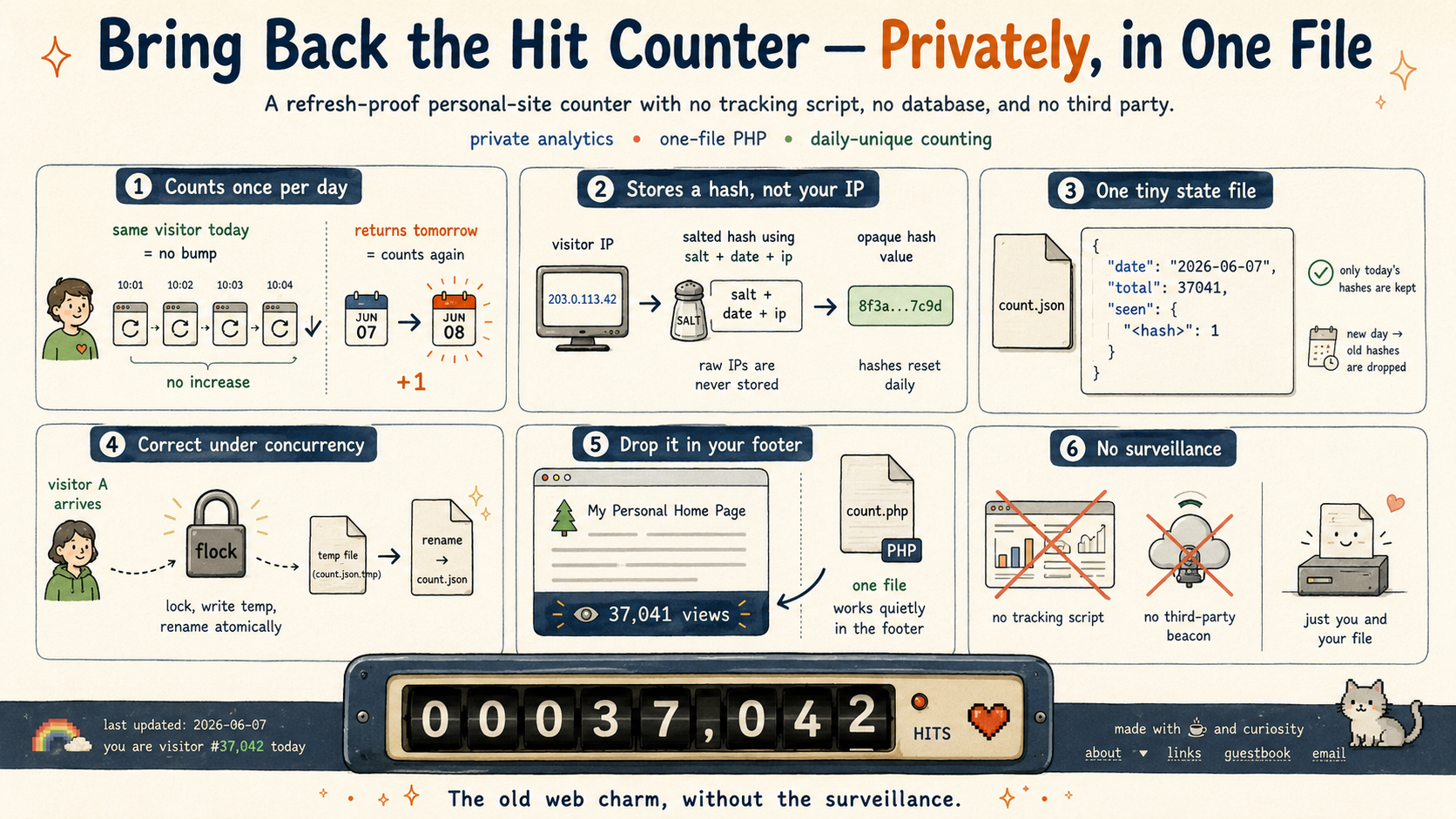
Every personal site used to have one: a little odometer in the footer ticking up with each visitor. They mostly disappeared, and the modern replacement is to bolt on an analytics suite that ships your readers' data to a third party in exchange for a dashboard you check twice a year.
That always felt like the wrong trade for a personal site. I wanted the number back without the surveillance — and it turns out a refresh-proof hit counter is about a hundred lines of PHP and a single JSON file. No database, no tracking script, nothing phoning home. There's one running in the footer of this very page. Here's how it works, and how to put one in your own footer.
Counting once, not every refresh
The core rule is simple: each visitor counts once per day, no matter how many times they reload. The naive version — increment on every page load — produces a number that mostly measures your own refreshing.
So on each request the server looks at the visitor's IP and only bumps the total if it hasn't already seen that IP today. "Today" is measured in UTC, so the day boundary is the same for everyone. The headline number becomes a running sum of daily-unique visits: a reload never moves it, but a genuine returning reader counts again tomorrow.
Storing what you need, and nothing else
This is the part I cared about most. The counter never writes a raw IP address to disk. Instead it stores a salted hash:
sha256(salt + date + ip)
The salt is a random value generated once per install and kept in a file that never leaves the server. Because the date is folded into the hash and the set of "seen" visitors is wiped every midnight, there is no way to link a visitor from one day to the next, and nothing sensitive sits at rest. If the data file leaked, it would be a list of opaque hashes — no addresses, no browsing history, nothing reversible.
The entire state on disk is this:
{ "date": "2026-06-07", "total": 37041, "seen": { "<hash>": 1 } }
seen holds only today's hashes, so it resets daily and never grows without bound. total carries forward forever.
The boring parts that make it correct
A counter is a deceptively good little exercise in getting concurrency right, because two visitors can land on the same instant. Read-modify-write a shared file without care and you silently lose increments.
Two things prevent that. Every update takes an exclusive lock (flock) before it touches the file, so writes are serialized. And the new state is written to a temporary file and then renamed over the old one — an atomic swap on POSIX filesystems, so a reader never sees a half-written file even if the process dies mid-write. There is a small test that fires fifty hits in parallel from fifty different IPs and asserts the total lands at exactly fifty; without the lock, it doesn't.
The salt is generated inside that same lock — a subtlety worth calling out, because it is easy to miss. Generate it outside the lock and two visitors arriving in the very first moments of a fresh install could each mint a different salt and race to write it, quietly breaking deduplication for one of them. It only matters once, on the first day of a new install, which is exactly the kind of bug that never shows up in casual testing.
Dropping it on your own site
The whole thing is one file, count.php. Copy it into your web root, add a few lines of HTML to show the number, and you are done:
<span id="site-counter" hidden></span>
<script type="module">
  const el = document.getElementById('site-counter');
  try {
    const r = await fetch('/count.php');
    if (r.ok) {
      const { total } = await r.json();
      if (typeof total === 'number') {
        el.textContent = `👁 ${total.toLocaleString()} views`;
        el.hidden = false;
      }
    }
  } catch (_) { /* leave hidden on failure */ }
</script>
The span starts hidden and only appears once the count loads, so if PHP is ever unavailable the page simply looks normal — no broken widget, no error a reader would ever see.
On Apache or typical shared hosting there is nothing else to do; PHP files execute by default. On nginx you add a small scoped block so that only this one file runs through PHP, rather than enabling it across your whole web root:
location = /count.php {
    include snippets/fastcgi-php.conf;
    fastcgi_pass unix:/run/php/php8.2-fpm.sock;
}
Borrow it
It is on GitHub under an MIT license: github.com/timbeach/site-counter. One file, a README, a demo page, and the tests. Take it, change the emoji, seed it with the count from whatever you are migrating off of, and put a quiet little odometer back in your footer where it belongs.